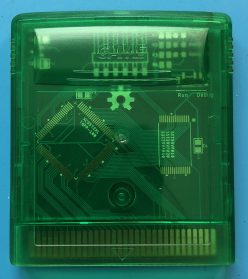
Ok, so far we’ve seen how we can fix a bricked EverDrive clone by desoldering the flash chip and by using an external programmer. However, we can take this one step further – EverDrives reprogram their own flash memory using nothing but the Game Boy as a programmer, so why can’t we? The obvious answer seems like “because we can’t run our own code when another cartridge is plugged in”, but fortunately for us, that’s not true! You see, the Game Boy doesn’t actually care where the code it runs lives and it has 8kB of internal WRAM (32kB on the Game Boy Color). So all we need to do is write some code to un-brick the cartridge, copy that code to the internal WRAM, jump to it and then we no longer have a need for the cartridge. We can remove the cartridge that originally contained the code and replace it with another one, say a bricked EverDrive clone, and then our code can interact with the newly inserted cartridge.
Let’s take a look how this works in practice:
CopyToRam:
    ld hl, _RAM ; Load the location of WRAM into hl
    ld d, high(RAM_CODE_SOURCE) ; Load the location of our code
    ld e, low(RAM_CODE_SOURCE)  ; to copy into de
.copyByte
    copy [hli], [de] ; Copy a byte and increment hl
    inc e ; Increment the lower byte of the source address
    jr nz, .copyByte ; Unless we reach an address ending in 0x00, loop
    jp _RAM ; Jump to the code we just copied to WRAM
And that’s all it takes to copy our code to WRAM (note that copy is a macro that moves data from a source to a destination through register a). I set up RAM_CODE_SOURCE to have a lower byte of 0x00, and since we copy until the lower byte equals 0x00 again, that gives us 256 bytes to work with, more than enough (there’s no reason why we have to limit this code to 256 bytes though, as long as it fits in WRAM, we could use it).
Here is the entirety of the code that we copy to WRAM:
section "ram_code", rom0[RAM_CODE_SOURCE]
RamCode:
.removeCart ; Wait for the original cartridge to be removed
    ld a, [$104]
    cp a, $FF
    jr nz, .removeCart

.waitForVBlank
    ld a, [rLY]
    cp a, 145
    jr nz, .waitForVBlank
    ; Move the window to be visible
    copy [rWY], WINDOW_Y

.insertCart ; Wait for the EverDrive clone to be plugged in
    ld a, [$104]
    cp a, $CE
    jr nz, .insertCart

    ld a, $FF
.waitForBoot ; Give the EverDrive clone a little time to boot up
    dec a
    jr nz, .waitForBoot

    copy [$BF00], $04
    copy [$BF80], $04
    copy [$0AAA], $AA
    copy [$0555], $55
    copy [$0AAA], $A0
    copy [$0208], $FE
    ld a, $0F
.programByte208
    dec a
    jr nz, .programByte208
    copy [$0AAA], $AA
    copy [$0555], $55
    copy [$0AAA], $A0
    copy [$0209], $FE
    ld a, $0F
.programByte209
    dec a
    jr nz, .programByte209

    copy [$BF80], $02
    nop
    jp CART_BOOT_ADDR
    halt
At first glance, it may look complex, but there’s very little to it. First, we read byte 0x0104, which is the start of the Nintendo Logo. We know that as long as a cartridge is inserted, this byte will read 0xCE. Once the cartridge is unplugged, there’s nothing to read anymore, so it will return the value 0xFF when we try to read it. We can take advantage of that to update the message on the screen when the cartridge is unplugged. Next, since we’re updating the screen, we need to wait for VBlank. Normally, you would use an interrupt for that, but since the interrupt vectors all live in the cartridge ROM, and the cartridge is no longer inserted, we can’t do that. Instead we just read rLY until it reached line 145, just past the end of the screen. Now we know we’re safe to update the screen and move on. All we do now is wait for the cartridge to be plugged back in by checking byte 0x0104 again to see when it reads 0xCE.
Once the EverDrive clone has been plugged in, there’s a quick delay to let the CPLD boot up and settle, then we’re good to send our data. As mentioned in the last post, we need to configure the CPLD to allow writing to flash by writing the byte 0x04 to 0xBF00 and 0xBF80. After that, it’s just a matter of sending the CFI commands to write our new serial number to bytes 0x0208 and 0x0209.
Finally, all that’s left to do is jump the code execution back to the cartridge boot address, 0x0100, so the newly un-bricked EverDrive can start up, good as new.
Ok, so this sounds good in theory, but I’m sure you’re wondering, “does this actually work?” And the answer is yes! But also, no. You see, the Game Boy wasn’t meant to hot-swap cartridges like this and in practice the EverDrive clones cause the Game Boy to restart when plugged in, erasing our program from WRAM and causing the process to fail. Ironically, it’s the newer “Low power consumption” clones that cause the Game Boy to reset. It appears the switched-mode power supply they use to reduce power actually draws more power when first starting up, leading to the reset. However, older clone devices use a simple LDO (Low Dropout) regulator, which doesn’t have this resetting problem. So on these older clones, this fix is entirely possible. See for yourself in the video below.
Amazing, right? Instead of desoldering flash chips or using custom-built cartridge programmers, it turns out all we need to un-brick an EverDrive clone is a few lines of code and another flash cart to load it onto. If you’re hoping to follow this guide to un-brick your EverDrive clone you can download the full source code or pre-built ROM on the project’s GitHub page. Since you’ll need a flash cart to run the un-bricking code, I’ll suggest this one last time; why not use a legitimate EverDrive? As I mentioned in the first post, the official EverDrive Game Boy x3 is only $44 and supports the original creator, which will allow him to keep making such great products.